Hotel SEO
Why Your Hotel Is a Blue Dot on Google Maps (And What Direct-Booking Money It's Costing You)
Abstract
A blue dot on Google Maps means your hotel's profile exists but its live rates aren't being transmitted to Google, so the OTAs that *do* feed rates dominate the booking surface — costing the average property a meaningful share of the 60% revenue premium that direct bookings command over OTA bookings. The fix is usually a single toggle in the PMS or channel manager the hotel is already paying for.
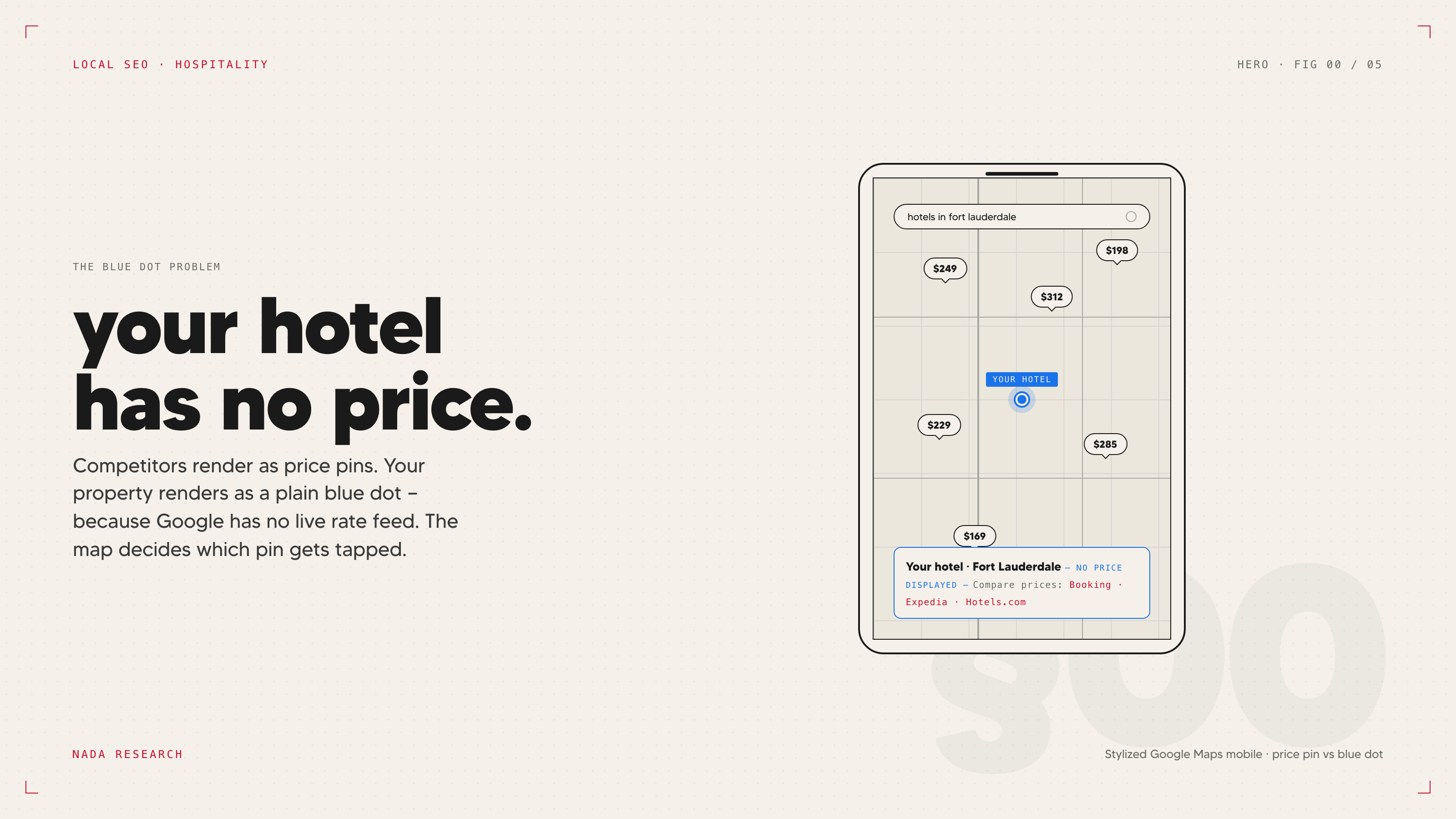
Open Google Maps on your phone. Log out of Google. Search for hotels in your area. Look at the pins. Some of them have prices on them — actual nightly rates, drawn directly into the map view. Tap any of those, and the knowledge panel that opens has a "Check Availability" box, an OTA price comparison, and increasingly, a row labeled "Official site" with the hotel's direct rate. Other pins are just plain blue dots. Tap one of those and the panel that opens has photos, reviews, address — and no rate, no booking surface, no direct-link row.
If your property is the blue dot, the cost is calculable. Direct bookings on a hotel's own website generate an average of $519 per reservation versus $320 via OTAs — a 60% revenue premium per booking, per SiteMinder's 2025 data. Across the industry, only 29% of hotel bookings globally are direct, and US hotels spend an estimated $6.3 billion annually on OTA commissions, per Phocuswright and AHLA. Every blue-dot booking that resolves to an OTA click instead of a direct one is the difference between those two numbers, multiplied by the share of guests who started their search on Google Maps. For most independents, that's a five- or six-figure annual leakage that's invisible in the P&L because it shows up as OTA commission rather than as missed direct revenue.
The fix is usually a five-minute check by someone in revenue management. Most marketing directors don't know it exists.
What you're looking at on Google Maps
The price pin and the blue dot are two visual states of the same data feed. Properties whose rates and availability are being transmitted to Google through a certified connectivity partner show as price pins — the rate is drawn into the map view, the knowledge panel populates with a Compare Prices block, and the "Check Availability" booking flow is live. Properties without that feed show as blue dots — Google has the GBP, knows the property exists, and serves it on the map, but has no live rate to display, so the OTAs that do feed Google rate data dominate the Hotel Pack, not the standard Local Pack, and the knowledge panel by default.
This isn't a ranking problem. The blue-dot listing can rank fine. It's a conversion problem at the SERP itself: the user is making a tap-decision based on what's on the pin, and the pin without a price loses to the pins with prices, even before the knowledge panel opens. When the user does tap through, the panel is dominated by Booking.com, Expedia, and Hotels.com — because those are the rate sources Google has — and the path of least resistance is to click an OTA. The hotel's own booking flow isn't visible on the same surface.
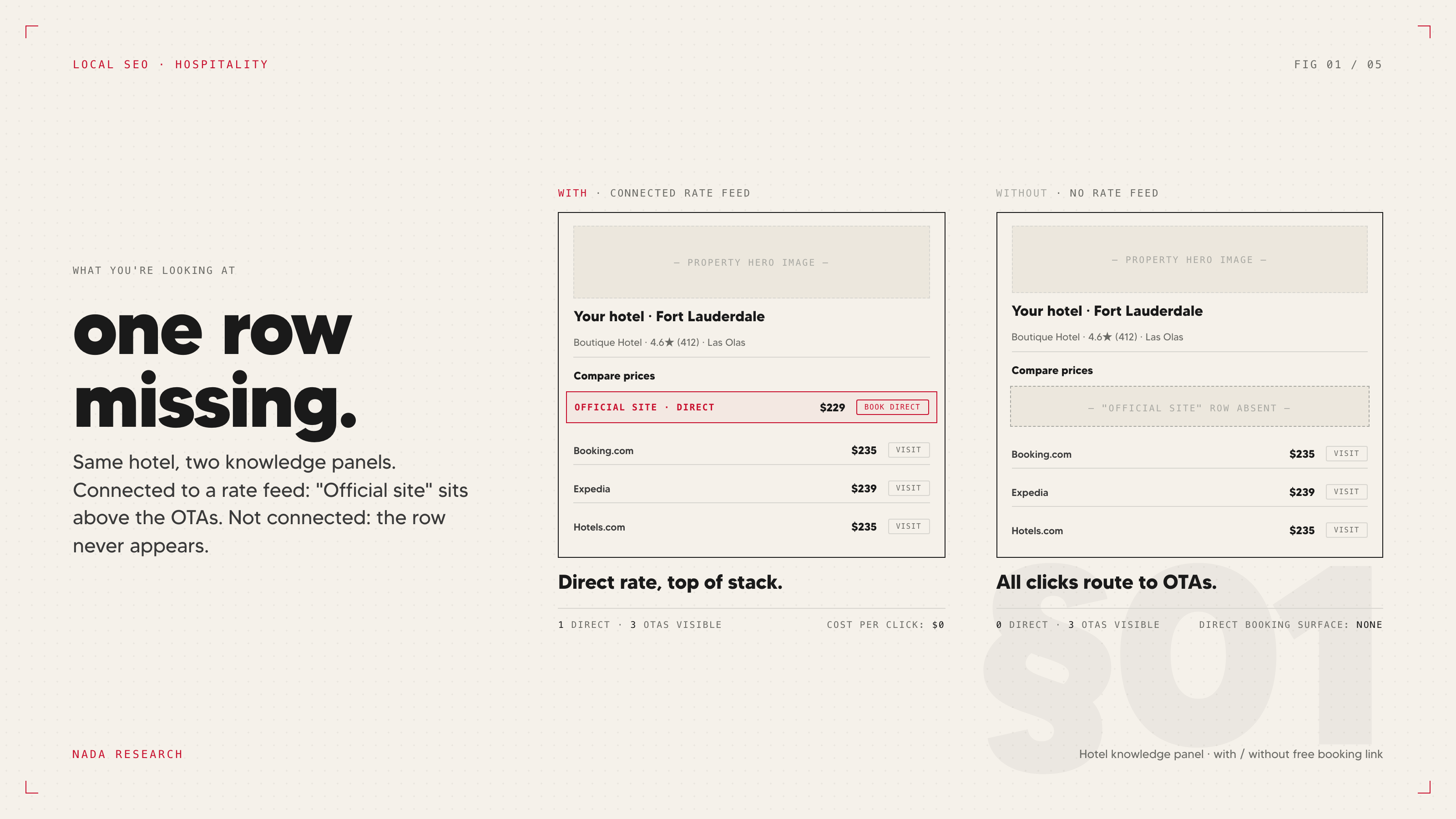
The Compare Prices block is the second piece of this real estate, and it works the same way. OTAs dominate it because they're the parties feeding rates. The hotel can be in the block too, but only if a rate is being fed.
What a free booking link actually is
In March 2021, Google introduced free booking links inside Google Hotel Search — a row in the knowledge panel labeled "Official site" or "Direct" that places the hotel's own rate alongside the OTA rates. It's free in the literal sense: there's no cost-per-click, no auction, no ad spend. Google's official tagline on this is worth quoting because it's true and misleading at once: hotels don't pay Google to appear in hotel search results and can't pay to influence their ranking. That's accurate about ranking. It is not accurate about visibility. The free booking link only appears if the property's rates and availability are being transmitted to Google in real time, and that requires a certified connectivity partner.
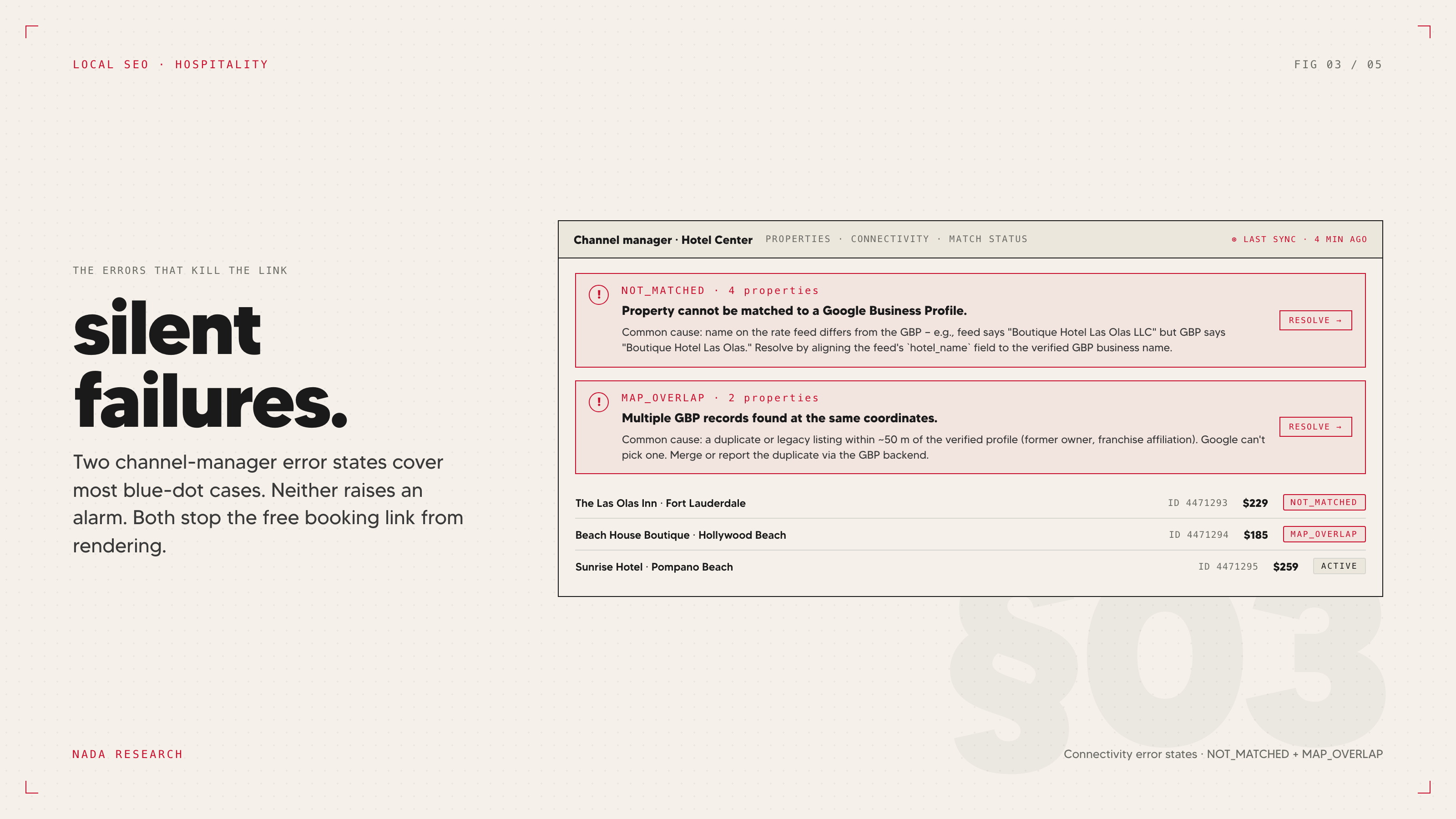
The connectivity partner is, in most cases, a feature of the PMS or channel manager the property is already paying for. Cloudbeds, Mews, SiteMinder, WebRezPro, and Hotelogix are all certified Google connectivity partners — meaning that if the hotel is on any of those platforms, the integration to feed rates to Google is already built. It just needs to be turned on. The five-minute check is to log into the PMS or channel manager backend, look in the channel or distribution settings, and find a channel option labeled "Google Hotels," "Google Free Booking Links," or in some platforms, "Google Hotel Center." If it's there and not enabled, enabling it is usually a single toggle and a credential confirmation. Once it's live, the rate feed begins, Google matches the feed to the GBP, and the free booking link appears in the knowledge panel — typically within a few days, sometimes up to two weeks.
If the property is on a PMS that isn't certified — which is more common for properties using legacy or highly customized systems than for boutique independents on modern stacks — the path is harder. Either the existing PMS adds Google support, or the hotel works with a third-party connectivity provider that bridges the gap, or the property migrates to a certified PMS. The cost-benefit on a migration is real but not always favorable; for a 60-room property, the operational cost of a PMS migration usually outweighs the direct booking lift in year one.
The connectivity partner path for independents
What's actually in the rate feed: nightly rates by room type, availability, taxes and fees, cancellation policy, and any rate-plan distinctions the property runs. The feed is updated in near-real-time as availability changes in the PMS. Google takes that feed, matches it to the GBP entity using the property's name, address, and other identifiers, and displays it in the knowledge panel and on the map.
Once the rate feed is live, the free booking link is mostly automatic — but "mostly" is doing real work in that sentence. The match between the feed and the GBP can fail. The feed can degrade silently. The knowledge panel can show the link one week and stop showing it the next, with no notification. Most properties only discover that the link has dropped when they audit the listing manually. A weekly check by someone — anyone — at the property is worth more than it sounds.
This is plumbing, not magic. It's the kind of integration that, once it's working, mostly just works. But the conversion lift on the listing is meaningful, and the cost is essentially zero beyond what the property is already paying for its PMS.
The error states that silently kill your free booking link
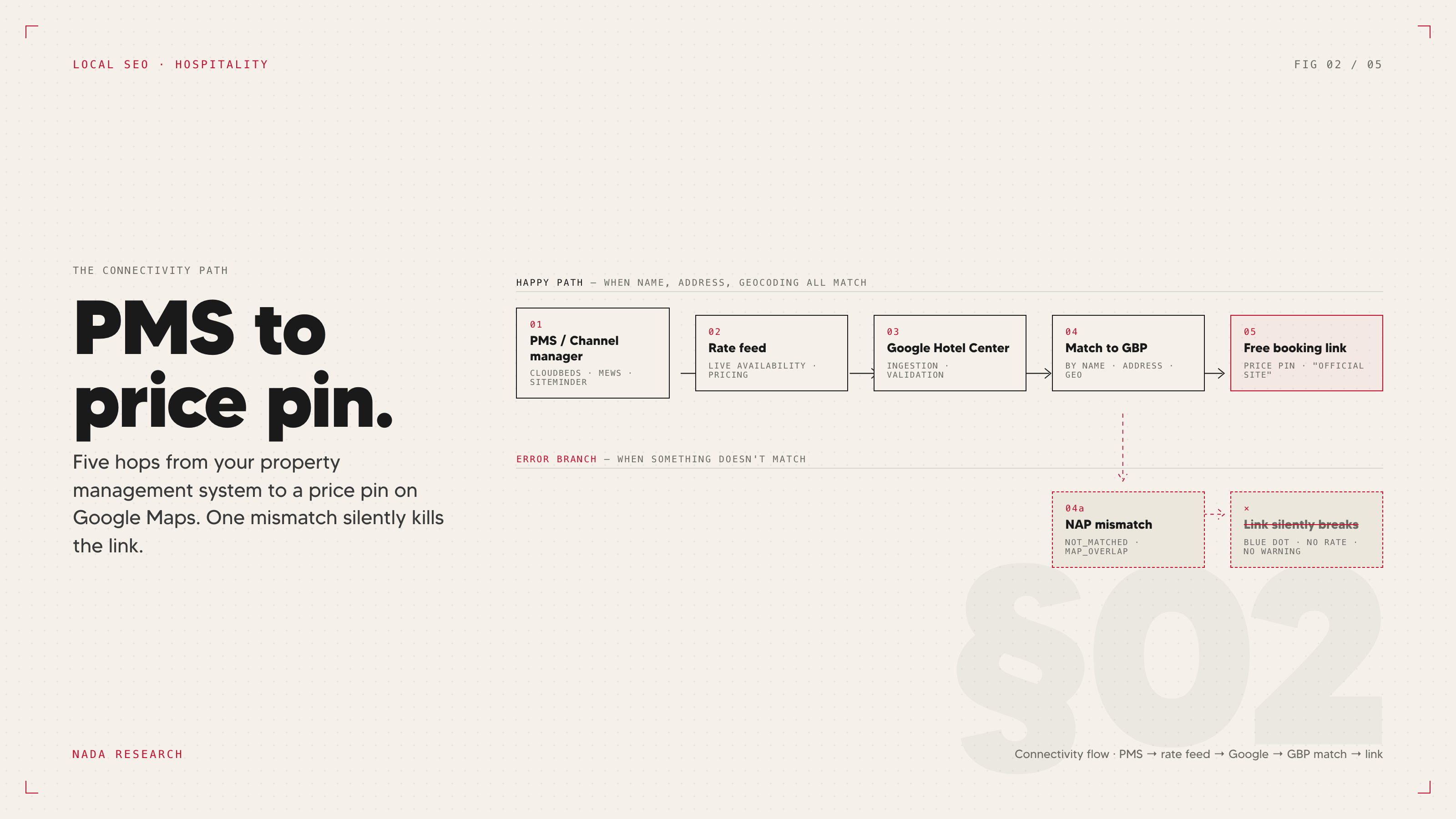
The match between the rate feed and the GBP isn't always clean, and when it breaks, the failure is binary — the free booking link doesn't appear, the price pin doesn't display, and the property defaults back to blue-dot status. Three error states cause most of these failures, and all three are documented in Cloudbeds' Google Hotel Search troubleshooting documentation (the same patterns apply to Mews, SiteMinder, and the others, though the error labels vary).
NOT_MATCHED means Google has the rate feed but cannot reconcile it with a Google Business Profile. Usually this is a name or address mismatch between the PMS record and the GBP. The PMS has the property listed as "The [Name] Hotel" with the address as "123 Main St, Suite 400"; the GBP has it as "[Name] Hotel" with "123 Main Street, #400." Google's entity resolution can handle minor formatting differences in many contexts, but the hotel rate-feed match is stricter than the general Local Pack and small inconsistencies break it.
MAP_OVERLAP means Google has detected what it thinks are duplicate listings for the same property — usually a legacy GBP from a previous owner or franchise affiliation, or an OTA-auto-generated profile that was never claimed. The fix is to identify the duplicate, claim it, and merge or close the unwanted listing. This is the most common cause of hotel listing problems generally and the most common reason a free booking link won't appear.
Pending approval means the rate feed is in but Google hasn't yet activated the free booking link. This usually clears in 7–14 days. If it persists past three weeks, there's an underlying issue worth opening a Hotel Center ticket on.
In Cloudbeds, these states are visible in the Google Hotels channel management screen as warnings. In Mews and SiteMinder, they appear in similar locations under the channel or distribution panel. None of them generate proactive notifications by default — the property has to look. This is the audit that gets skipped because nobody owns it: revenue management owns the rate feed, marketing owns the GBP — and there are hotel GBP optimization levers to keep the entity clean — but the error state lives at the seam between the two.
Free booking links vs. Google Hotel Ads — what's actually different
Free booking links are not Google Hotel Ads. The two products share a backend (Hotel Center, the same connectivity partners) but operate differently on the SERP, and confusing them is how hoteliers either underinvest in the paid product or overinvest in the free one believing it'll fully solve their direct booking gap.
Free booking links: free, but appear below paid OTA bids in the Compare Prices block. The placement is real estate the OTAs are bidding on. In a market where Booking.com is bidding aggressively, the free direct link is below the paid OTA links, and many users tap the first option they see.
Google Hotel Ads: paid, auction-based, typically $1–$3 per click in most markets. Properties that bid get priority placement in the Compare Prices block and the knowledge panel. In competitive markets — especially urban — being absent from Hotel Ads means the free booking link is competing for whatever attention is left after the OTAs have spent their budget.
The honest framing is that free booking links are worth doing because they're free, they sometimes convert well, and they raise the floor on direct distribution. They are not a substitute for a paid metasearch strategy in any market where OTAs are bidding seriously, which is most urban markets.
The European context deserves a separate note. Google's DMA compliance changes in 2024 prioritized third-party directories over Google's own surfaces in European SERPs and reduced free booking link visibility specifically. European hotels reported direct booking link clicks dropping by as much as 30% after the compliance update, per DAC's 2024 summary of the Google updates. If the property has European exposure, the free booking link math is meaningfully worse than the US version, and the answer is not to give up on direct distribution but to plan around it — paid Hotel Ads, metasearch via Trivago or Tripadvisor, and a stronger investment in the property's own site as the primary direct surface. The honest read on metasearch for independent hotels in this market is that free links are a floor, not a ceiling: the paid layer is where real direct-booking parity gets fought.
The AI Mode question
The connectivity partner question is no longer purely about free booking links. It's increasingly the prerequisite for being visible in AI Mode at all.
In February 2026, Marriott and Google announced a partnership that lets travelers book Marriott properties directly through Google's AI Mode using natural language, bypassing OTA interfaces entirely. Mark Fancourt's read on it in Hospitality Net is the right framing: this is a signal of trajectory, not a finished playbook. AI Mode's adoption is still uneven, the booking flows are early, and the share of hotel demand it captures today is small. But the architectural direction is hard to miss. AI Mode generates booking recommendations from structured data and connectivity feeds. Hotels that have a clean entity, real-time rate transmission, and accurate attributes will be candidates for AI Mode recommendations as the surface matures. Hotels that don't will not be.
The competitive opportunity for independents is that the prerequisites — a certified connectivity partner, a clean GBP, accurate Hotel Details — are achievable on a 90-room boutique's budget in a way they aren't on an enterprise rollout timeline. By the time AI Mode becomes a meaningful booking surface, independents that did the plumbing now will be eligible. Chains that rely on legacy distribution stacks may not be.
Don't oversell this internally. Adoption is real but partial, and the people selling AI Mode optimization as a finished product are getting ahead of the evidence. The honest position is that the same fundamentals that make a property visible in the Hotel Pack today — clean entity, connectivity feed, accurate attributes, real reviews — are also what positions it for AI Mode as that surface develops. The work is the same. The deadline just moved closer.
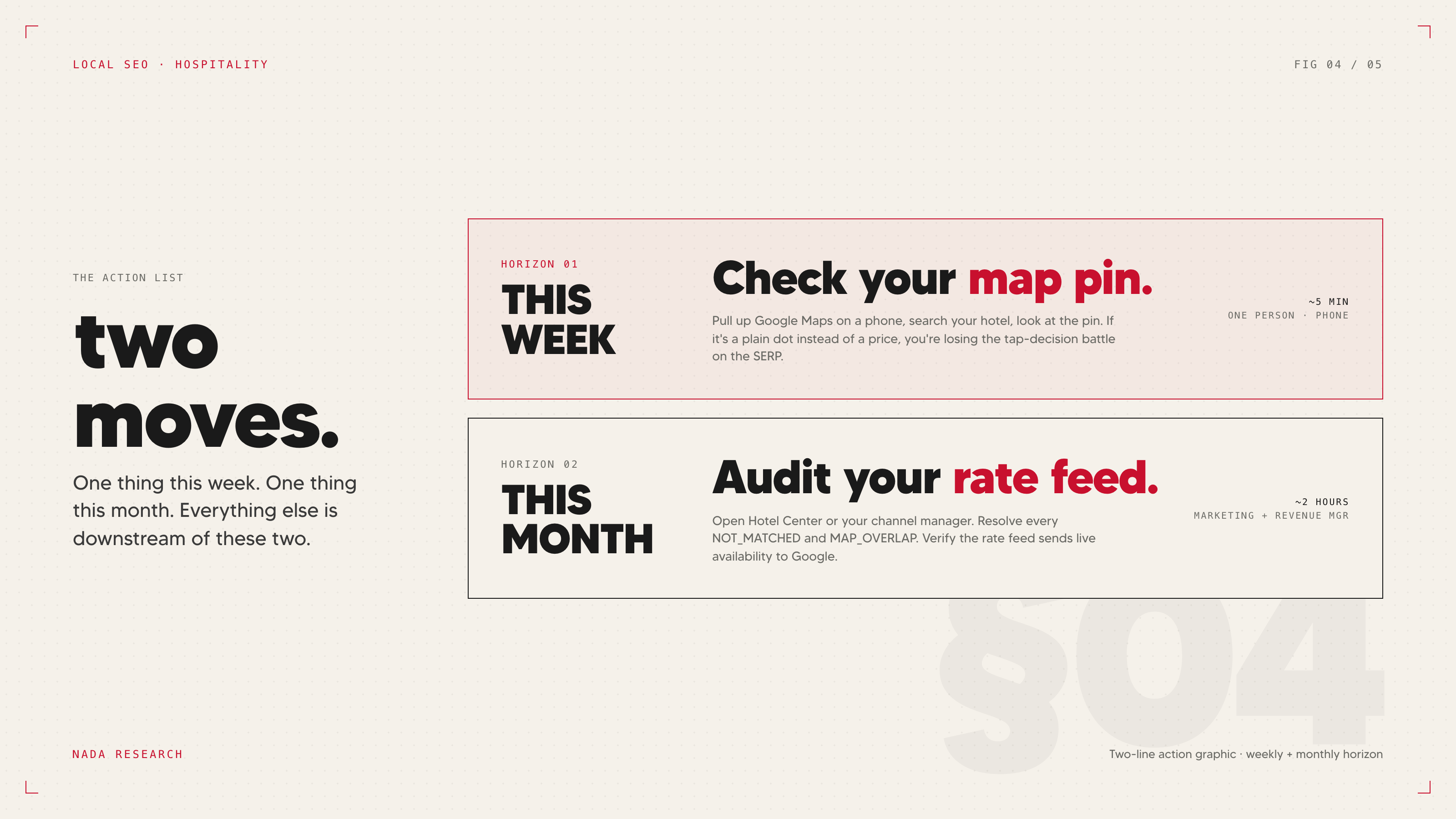
This week: open Google Maps on your phone, log out, search your property. Confirm whether you're a blue dot or a price pin. If you're a blue dot, the next action is a five-minute check in the channel manager — see whether the Google Hotels integration exists and whether it's enabled.
This month: if the integration is enabled and you're still a blue dot, audit for the error states. NOT_MATCHED, MAP_OVERLAP, or pending approval, in that diagnostic order. The most common cause is a duplicate GBP listing that nobody at the property knew was active. The fix is sometimes thirty minutes; sometimes the duplicate is a legacy listing tied to a previous owner's account and the resolution path runs through Google support.
For the strategic context on why this surface looks the way it does, see Hotel Pack vs. Local Pack. For the broader entity-hygiene work that keeps a connectivity feed matched and a knowledge panel clean, see the five GBP levers.
Terms used in this post
- Free booking link
- A row in the Google Hotel Search knowledge panel — usually labeled "Official site" or "Direct" — that places a hotel's own nightly rate alongside OTA rates. Introduced by Google in March 2021; free of cost-per-click but only appears if the property feeds live rates through a certified connectivity partner.
- Price pin
- A Google Maps pin that displays the property's nightly rate directly on the map. Indicates the hotel's rate feed is reaching Google. The opposite state — a plain blue dot — means no live rate is being transmitted.
- Connectivity partner
- A certified third-party platform that pushes a hotel's rates and availability to Google in real time. Most modern boutique-friendly platforms (Cloudbeds, Mews, SiteMinder, WebRezPro, Hotelogix) are already certified — the integration just needs to be enabled.
- PMS (property management system)
- The software a hotel uses to manage reservations, room inventory, guest records, and rate plans. The PMS is usually the source of truth that feeds rates into the connectivity partner pipeline.
- Channel manager
- A platform that distributes a hotel's rates and availability across multiple sales channels — OTAs, direct, metasearch — from a single inventory source. Often bundled with or adjacent to the PMS, and frequently the place where the Google Hotels integration toggle lives.
- Google Hotel Center
- Google's backend interface for hotel rate-feed management, the same backend that powers both free booking links and paid Google Hotel Ads. Where rate-feed errors like NOT_MATCHED and MAP_OVERLAP surface.
- NOT_MATCHED
- A Hotel Center error state meaning Google received the rate feed but cannot reconcile it with a Google Business Profile. Usually caused by a name or address mismatch between PMS record and GBP, since the hotel rate-feed match is stricter than general entity resolution.
- MAP_OVERLAP
- A Hotel Center error state meaning Google has detected what it thinks are duplicate listings for the same property — typically a legacy GBP from a previous owner, or an OTA-auto-generated profile that was never claimed. The most common cause of free booking link failures.
- Google Hotel Ads
- Google's paid metasearch product for hotel rates. Auction-based, typically $1–$3 per click, and shares the Hotel Center backend with free booking links but operates above the free links in the Compare Prices block.
- Online travel agency (OTA)
- Third-party booking sites — Booking.com, Expedia, Hotels.com — that resell hotel inventory. The dominant rate sources Google has, which is why blue-dot listings default to OTA traffic.
- Compare Prices block
- The section of the Google Hotel Search knowledge panel that lists rates from multiple sources side by side. Free booking links appear here below paid OTA bids; the hotel can be visible only if a rate is being fed.
- AI Mode
- Google's generative-AI conversational search interface. Increasingly tied to connectivity feeds — the architectural direction signaled by the February 2026 Marriott–Google partnership is that AI Mode booking recommendations draw from structured data and rate feeds, making connectivity a prerequisite for visibility there too. ---
Frequently asked questions
-
What is a Google free booking link?
A free booking link is a row in the Google Hotel Search knowledge panel — usually labeled "Official site" or "Direct" — that displays a hotel's own nightly rate alongside the OTAs. Google introduced free booking links in March 2021. They're free in the literal sense: no cost-per-click, no auction. But they only appear if the property's rates and availability are being transmitted to Google in real time through a certified connectivity partner, which is usually a feature of the PMS the hotel is already paying for.
-
Why does my hotel show as a blue dot on Google Maps instead of a price?
A blue dot on Google Maps means Google has your property's profile but no live rate feed to display, so it can't draw a price into the pin. Properties whose rates and availability are transmitted to Google through a certified connectivity partner show as price pins instead. The blue dot itself doesn't hurt your ranking — but it loses the tap-decision battle on the SERP, because users tap the pins with prices first, and the OTAs that do feed rates dominate the knowledge panel that opens.
-
How do I enable free booking links on Cloudbeds, Mews, or SiteMinder?
All three are certified Google connectivity partners, so the integration is built in. Log into the channel or distribution settings panel of your PMS and look for a channel labeled "Google Hotels," "Google Free Booking Links," or "Google Hotel Center." Enabling it is usually a single toggle plus a credentials confirmation. The rate feed begins immediately, and the free booking link typically appears in the knowledge panel within a few days, sometimes up to two weeks.
-
What does NOT_MATCHED mean in Google Hotel Center?
NOT_MATCHED means Google has received your rate feed but cannot reconcile it with your Google Business Profile. The most common cause is a name or address mismatch between the PMS record and the GBP — small differences like "The [Name] Hotel" vs. "[Name] Hotel," or "123 Main St, Suite 400" vs. "123 Main Street #400." Google's hotel rate-feed match is stricter than its general entity resolution, so minor formatting inconsistencies that wouldn't break a Local Pack listing will break this one. Aligning the PMS, GBP, and OTA records to one canonical name and address resolves it.
-
Are free booking links the same as Google Hotel Ads?
No. They share the same backend (Hotel Center, the same connectivity partners) but operate differently. Free booking links are free and appear below paid OTA bids in the Compare Prices block. Google Hotel Ads are paid, auction-based, and typically $1–$3 per click. In competitive urban markets where OTAs bid aggressively, free booking links alone won't close the direct-booking gap — they're worth doing because they're free, but they're not a substitute for a paid metasearch strategy.